


How to Choose a Gateway for LoRaWAN: Indoor vs Outdoor, 8 vs 16 Channel



Almost everyone shopping for a gateway starts with the same question: eight channels or sixteen? It is the number printed on the box, so it feels like the decision that matters. It usually matters least.
Three mistakes come up again and again, and all three are expensive to undo.
Buying on sensor count. A team adds up three hundred sensors and orders the sixteen-channel model, because more channels sound safer. Channels are not used up by how many sensors you own. They are used up by how often those sensors talk.
Treating the enclosure as packaging. An indoor gateway is rated IP30: it keeps dust out, but not water, and it is only guaranteed to -10 °C. Put one in an unheated car park and it runs happily until the first hard frost.
Leaving the internet connection until install day. The costly one. The gateway is right in every other respect, then the engineer gets to the roof and finds no network cable, no WiFi in range, and no budget for a SIM.
None of those is a radio problem. Each happens because the questions were answered in the wrong order. Here is the order that works.
How Do You Choose a Gateway for LoRaWAN?
A LoRaWAN® gateway is the base station that receives packets from LoRa® sensors and forwards them to a network server over ethernet, WiFi, or cellular. Choosing one means answering six questions in order: where it mounts, how much traffic it absorbs, how it reaches the internet, how it is powered, which regional band applies, and who runs the server.
The order matters more than the list. Two of the six are fixed once the unit is bolted in place; the rest can be revised later. Sequence by what stays reversible and the model choice falls out at the end. New to the protocol? What LoRaWAN is and how it differs from LoRa covers it, and the LoRa Alliance maintains the specification.
Where It Mounts Decides More Than the Marketing Copy Does
Two numbers settle indoor versus outdoor: the ingress rating, and the lower bound of the operating temperature range.
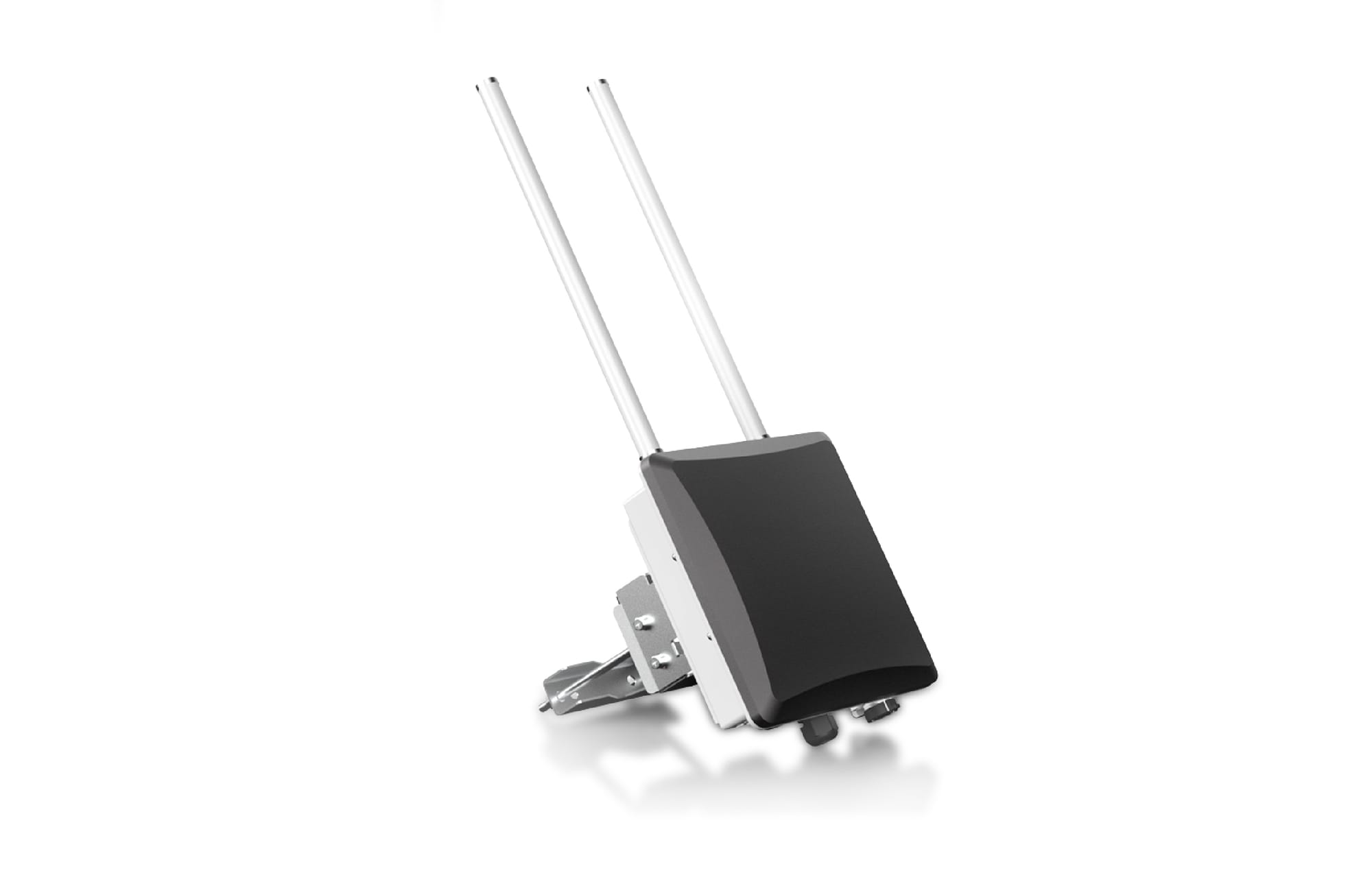
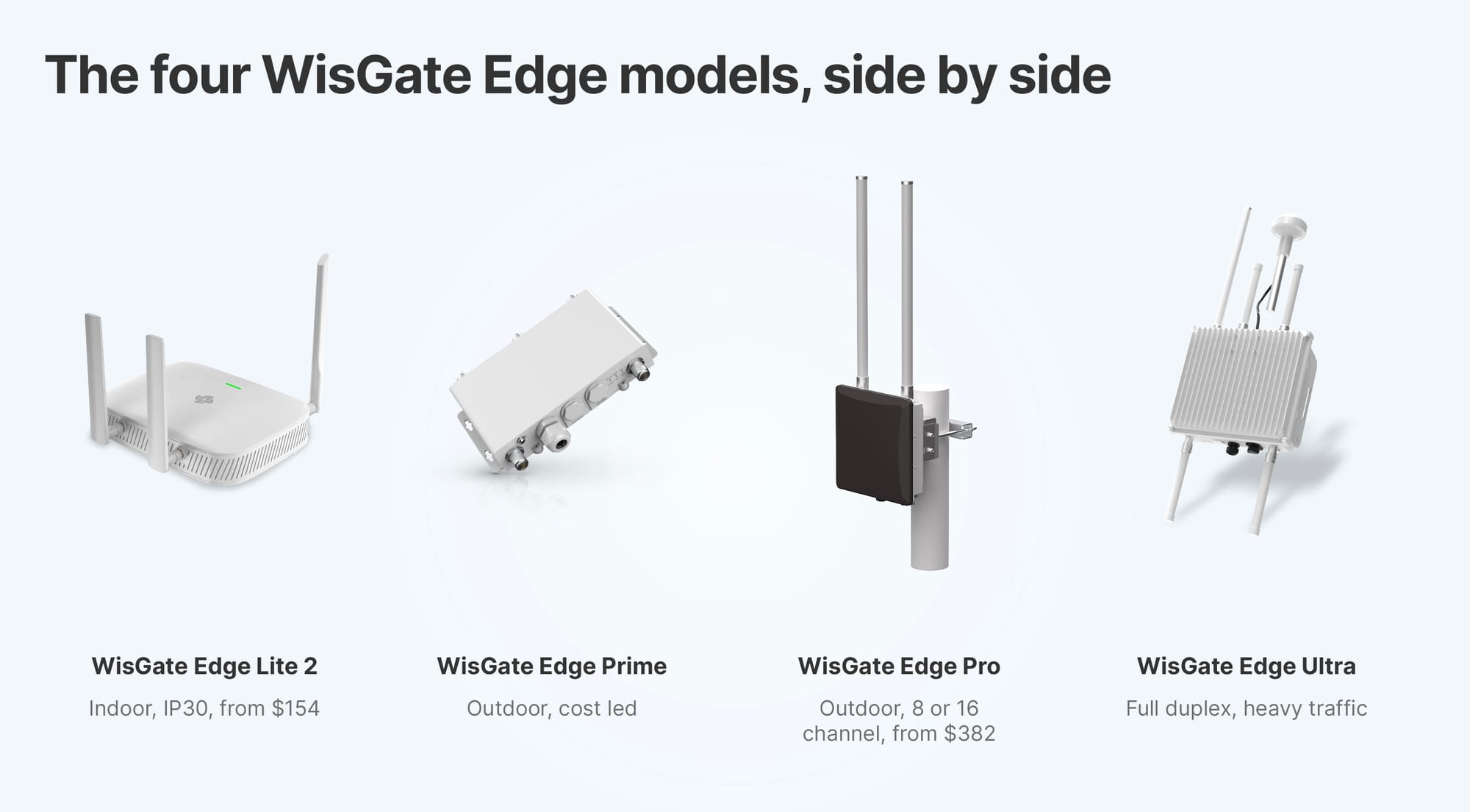
An indoor Gateway for LoRaWAN such as the WisGate Edge Lite 2 is dust protected rather than sealed, and small enough to hide above a ceiling tile. Its outdoor counterpart, the WisGate Edge Pro, is sealed with cable glands, carries external antennas and GPS, and tolerates twenty degrees more cold.
The sites that catch people out are technically indoors. A multi-storey car park is unheated and built of reinforced concrete, so it fails on temperature and eats link budget at once. An unheated warehouse reads as an office on a floor plan and behaves like a rooftop in February. If the antenna has to be outside, or the air around the box is not conditioned, specify outdoor.
Height beats transmit power: a rooftop unit with a clear horizon out-performs a stronger radio at desk level.
Channels Buy Airtime, Not Distance
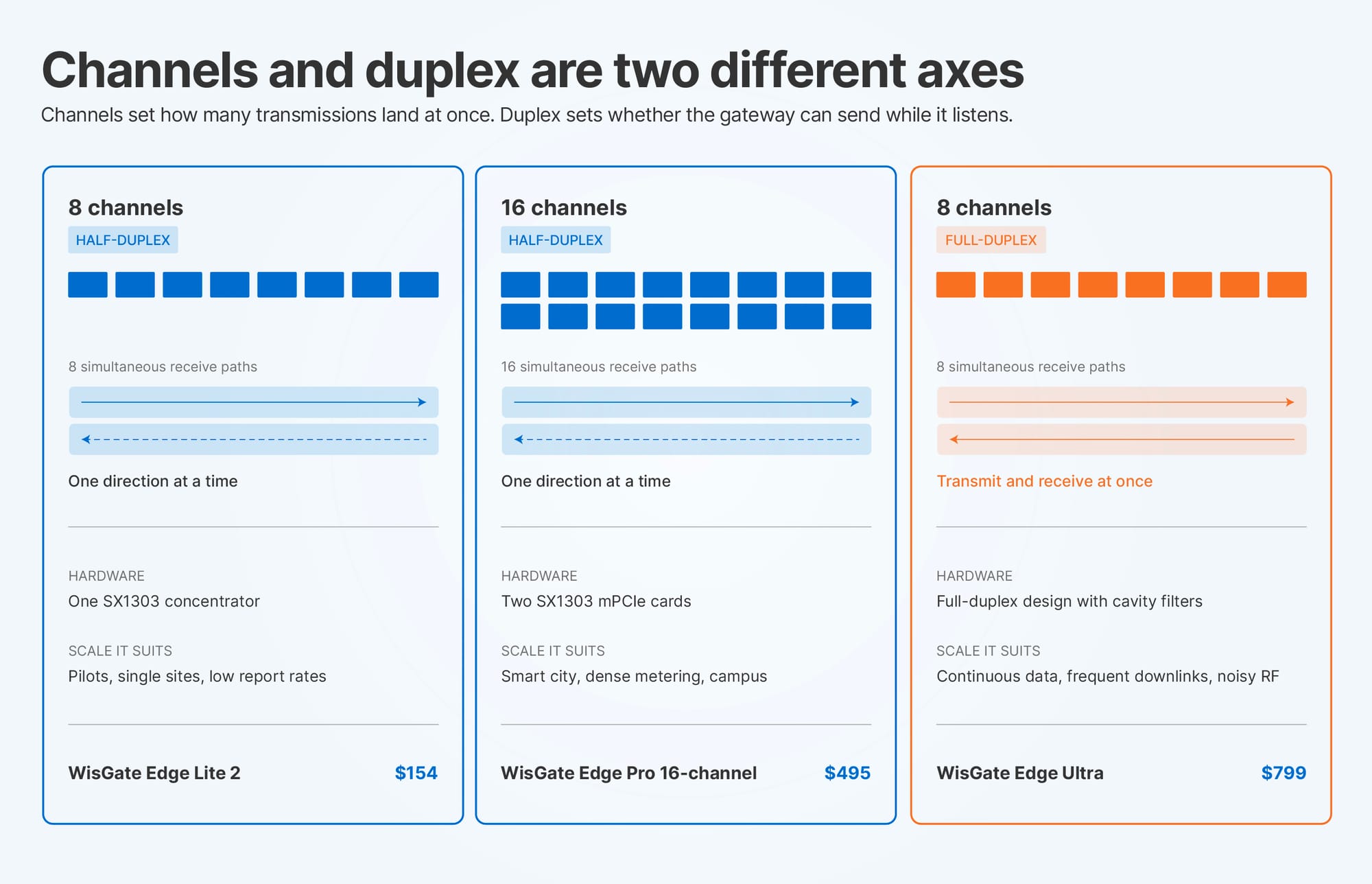
Doubling the channels does not extend how far the gateway hears. It increases how many transmissions it accepts at the same instant without collisions.
What consumes capacity is airtime: device count, multiplied by how often each device transmits, multiplied by how long each transmission holds a channel. The third variable is the one that surprises people.
Work it through. A 12-byte uplink at SF7 on a 125 kHz channel holds that channel for roughly 50 milliseconds. The same uplink at SF12, which is where a sensor at the edge of coverage ends up, holds it for about 1.5 seconds. Thirty times the airtime for the same 12 bytes. On a fifteen-minute reporting interval, four distant sensors therefore cost more channel time than a hundred close ones. Count airtime, not devices.
Duplex mode is the second axis and rarely surfaces in the 8 channel vs 16 channel gateway comparison. Half-duplex units transmit or receive but never both. Full-duplex does both at once, cutting latency where downlinks are frequent.
The figure that ends the argument: on the same WisGate Edge Pro chassis, sixteen channels instead of eight costs $113 more, $382 against $495. That rarely decides a budget, so the question is whether the second concentrator will ever be busy. And when the constraint turns out to be coverage rather than capacity, a second gateway fixes both.
Backhaul Is the Question That Should Come Second
Ask it early, because it strands otherwise correct hardware. At the top of a mast, reaching the network server is often harder than mounting the unit.
- Ethernet is standard across the current line and is the answer wherever a drop already reaches the mounting point. PoE improves on it, because one cable carries power and data.
- WiFi removes the cabling problem indoors, in exchange for depending on a network you may not administer.
- Cellular, LTE Cat 4 on the C variants, covers farms, pumping stations and kerbside cabinets with no wired internet, at the cost of a SIM per site.
Ethernet as primary with cellular as automatic fallback on the same unit is the arrangement worth copying. A cut cable becomes a log entry rather than an outage.
A 16-channel gateway with no route to the server is an expensive weather station.
Power, Band and Server: The Three That Get Skipped
Power
Power follows the mounting point. PoE at IEEE 802.3af, 37 to 57 VDC, runs across the WisGate Edge line, with 802.3at on the Ultra, so an outdoor install needs one cable rather than two. Off-grid sites take the RAK9155 Battery Plus for battery and solar.
Regional band
Regional band cannot be changed afterwards: EU868, IN865 and RU864 for Europe and parts of Asia, US915, AU915, KR920 and AS923 for North America, Australia and Asia Pacific, CN470 for China. Order the wrong variant and you own the wrong unit, so confirm your country's plan and match the antenna to it.
Network server
The LoRaWAN network server decides operating cost. Most current WisGate models include a built-in server implementing LoRaWAN 1.0.3, so a single site runs with no subscription and keeps collecting when the internet drops. Larger deployments move to The Things Network, ChirpStack or AWS IoT Core.
Pairing works the same way either side of that choice. The gateway runs a packet forwarder, you register it by its 64-bit gateway EUI, and it opens a session to the server's address. Semtech UDP is the common default. Basics Station adds TLS and central configuration, which matters once you stop visiting sites in person.
Fleet management
Past a handful of units, the dominant cost is engineers driving to sites, not hardware. WisDM, the RAKwireless remote management console, covers configuration, firmware and provisioning across every WisGate unit from one place, so a change to fifty gateways is not fifty journeys. Weigh it while choosing models. What an IoT gateway does covers where the box sits.
Which WisGate Model Fits Which Deployment
Prices as listed on 2026-10-6. All four take ethernet and WiFi, with LTE on the C variants. Full range on the WisGate Edge store page.
One line in that table explains the range: the Lite 2 and the Pro transmit at the same 27 dBm. Moving up does not buy a stronger radio, it buys sealing, temperature tolerance, channel capacity and installation options, none of which can be retrofitted.
So: Lite 2 for a pilot, office or single warehouse. Prime for outdoor rollouts where cost leads, Pro where the site is exposed or GPS matters. Ultra where traffic is continuous or RF is noisy.
If the box also has to run containers or bridge more than one radio technology, that is edge computing rather than a LoRa gateway, and belongs on WisGate Connect.
Frequently Asked Questions
How do I choose a Gateway for LoRaWAN?
Answer six questions in order of what stays changeable: where it mounts, airtime load, backhaul, power, regional band, and who runs the network server. Mounting and backhaul come first, because both are fixed once installed.
What is the difference between an indoor and outdoor Gateway for LoRaWAN?
Sealing, temperature range and antennas. The WisGate Edge Lite 2 is IP30 and rated from -10 °C. The WisGate Edge Pro is IP67 with cable glands, rated from -30 °C, with external antennas and GPS. Anywhere unconditioned needs the outdoor specification.
What is the difference between an 8 and 16 channel gateway?
A 16-channel unit carries a second SX1303 concentrator, so it accepts roughly twice as many simultaneous transmissions. Range is identical. On the WisGate Edge Pro the step is $382 to $495.
Which Gateway for LoRaWAN should I buy?
Start from the environment, the one choice you cannot revise after installation. Indoors, the WisGate Edge Lite 2 at $154. Outdoors, the Prime where cost leads and the Pro where the site is exposed or GPS matters. The Ultra for continuous traffic and noisy RF. Take sixteen channels only if the airtime maths calls for it.
How many devices can one gateway handle?
No fixed number exists. Capacity is consumed by airtime: device count multiplied by transmission frequency multiplied by how long each message holds a channel. A 12-byte uplink takes about 50 ms at SF7 and about 1.5 s at SF12, so a few distant devices can cost more than many close ones.
Do I need an outdoor gateway for my deployment?
If the antenna sits outside, or the air around the enclosure is not conditioned, yes. Check the ingress rating and the minimum operating temperature rather than whether the site is technically indoors.
TL;DR
- Three mistakes cause most of it: buying on device count, treating the enclosure as packaging, leaving backhaul until install day.
- Sequence by what stays reversible. Mounting and backhaul are fixed once installed. Channel count is not.
- Indoor versus outdoor is two numbers: IP30 and -10 °C against IP67 and -30 °C. Unconditioned air means outdoor.
- Channels buy airtime, not distance. One SF12 uplink costs thirty SF7 uplinks. Sixteen channels means a second concentrator, $113 more on the same chassis.
- Match the model: Lite 2 for pilots and indoor, Prime and Pro for outdoor scale, Ultra for continuous traffic and noisy RF. Budget for remote management before the fleet grows.
Written by the RAKwireless team, who design and manufacture the WisGate Edge and WisGate Connect lines referenced above.