


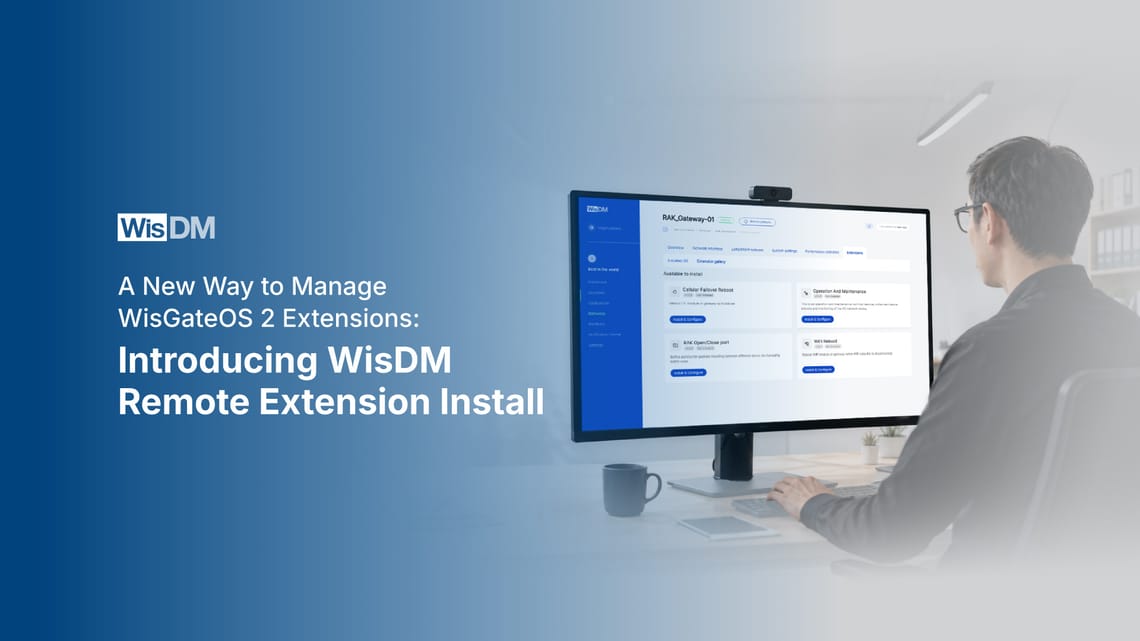
WisDM Remote Extension Install: Manage Gateway Extensions for LoRaWAN® Remotely



A new way to deploy capabilities across WisGateOS 2
WisDM Remote Extension Install adds remote extension management to the WisDM workflow for gateway fleets for LoRaWAN®. It allows operators remotely install, update, and manage supported WisGateOS 2 extensions on each eligible gateway from WisDM.
Remote Extension Install handles how supported extensions are deployed and managed, one gateway at a time, from a single console. The extensions themselves provide the gateway functions, such as connectivity recovery, maintenance automation, and network management.
The shift is in how those extensions reach a gateway already in the field. Operators can identify the devices that need a function, choose the appropriate extension, begin the rollout, and follow its status within the same environment. As requirements change across sites or deployments, supported functionality can evolve with them instead of remaining limited to what was configured at installation.
That raises an important question: what exactly is a WisGateOS 2 extension, and where does Remote Extension Install fit within WisDM?
What is WisDM Remote Extension Install?
WisDM Remote Extension Install is the deployment mechanism for supported WisGateOS 2 extensions. Built into WisDM, it gives gateway teams a centralized way to install, update, and monitor extensions on an eligible gateway individually.
It handles the rollout layer: operators select the gateway, choose the supported extension they want to deploy, start the installation, and follow its status from WisDM.
What Are WisGateOS 2 Extensions?
WisGateOS 2 extensions are modular software components that add specific functions to a gateway without changing its core operating system. Depending on the extension, those functions can address connectivity recovery, maintenance, or network management.
Current examples include WiFi recovery, cellular failover, scheduled maintenance, and port management.
How Are WisGateOS 2 Extensions Different from Firmware Updates?
WisGateOS 2 extensions and firmware updates serve different purposes. A firmware update changes the underlying WisGateOS 2 software, while an extension adds or changes a specific capability without replacing the gateway’s core operating software
How is this different from installing an extension through SSH?
SSH provides direct command-line access to an individual gateway. Installing extensions this way can require operators to connect to gateways separately and carry out the installation steps manually.
WisDM Remote Extension Install moves supported extension installation into the WisDM workflow. Operators select the target gateway, choose a supported extension, start the remote installation, and monitor its status from WisDM.
Why RAK Built It: Gateway Capabilities Should Not Stop Evolving After Deployment
A LoRaWAN deployment rarely stays exactly as it was on day one. Connectivity conditions shift, maintenance policies mature, and network controls may need to change long after the hardware is installed.
Remote Extension Install was built around that reality: the software functions available to a WisGateOS 2 device should be able to evolve with the operation.
Manual device-level work creates room for inconsistency. When the same software change has to be carried out separately on individual units, often over SSH, it's easy for versions to drift. WisDM replaces that manual process with a guided, repeatable install for each gateway, making it easier to keep track of what has been applied and where.
Post-deployment changes are part of the lifecycle. A function that was not needed at launch may become relevant later as connectivity, maintenance, or network policies develop.
The next question is how that process works inside WisDM.
How WisDM Remote Extension Install Works
The workflow is intentionally simple: choose where the extension should go, select what you want to add, then follow the rollout in WisDM.
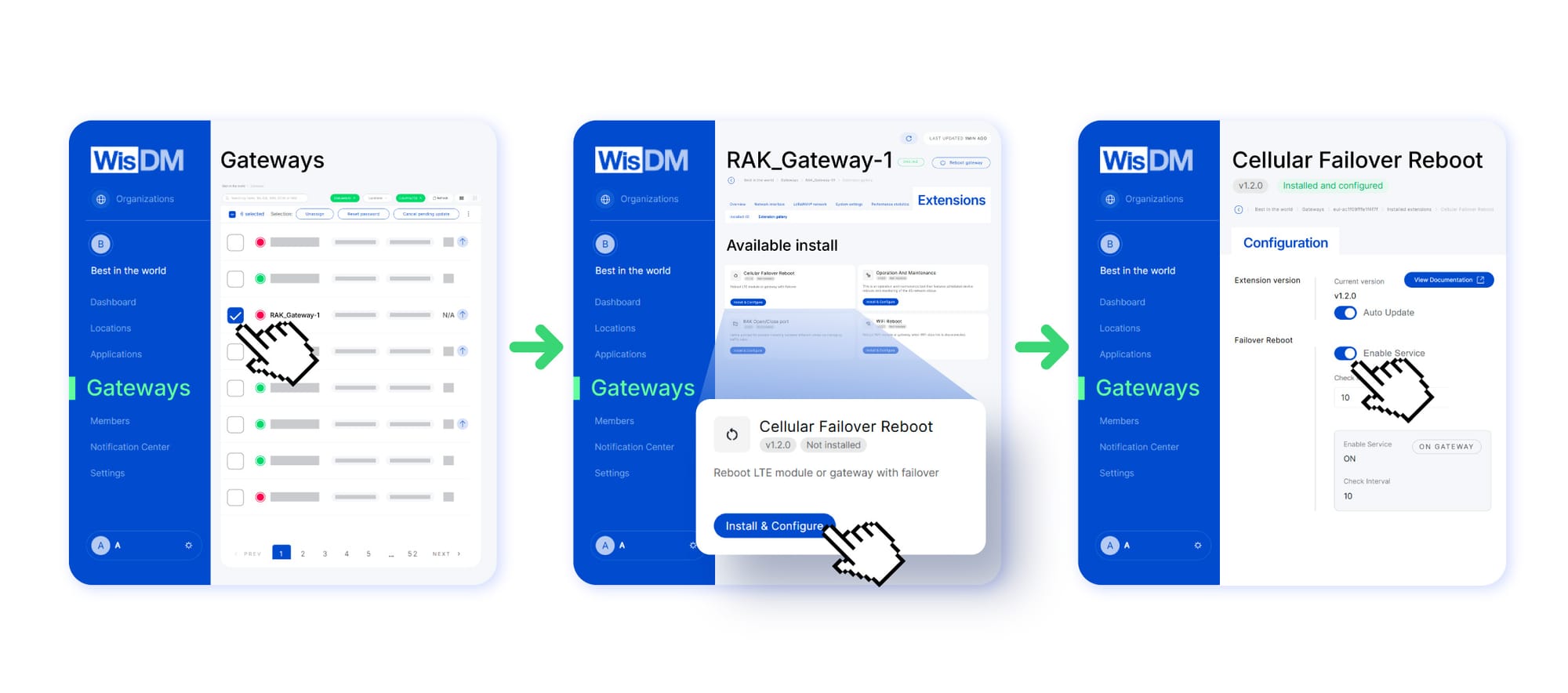
Step 1: Select the Gateway
Start by choosing the gateway that should receive the extension. Extensions are currently installed one gateway at a time, keeping each change scoped and easy to verify before moving to the next device.
Step 2: Choose the Supported WisGateOS 2 Extension
Next, select the required option from the supported extension catalog. The choice depends on the function the gateway needs, whether that relates to connectivity, maintenance, or network management.
Step 3: Start the Rollout and Monitor Status
Once the target gateway and extension are selected, begin the remote installation. WisDM displays rollout status so you can follow progress on the chosen device and see how the deployment is proceeding.
Think of it as an MDM-style approach for a gateway for LoRaWAN: WisDM brings app-style, no-SSH deployment to WisGateOS 2 extensions from a central platform. No need to open each gateway's own console.
Which WisGateOS 2 Extensions Can You Deploy Remotely?
WisDM Remote Extension Install currently highlights four WisGateOS 2 extensions, each adding a specific function to an eligible gateway. More extensions will be added to WisDM in the coming months.
WiFi Reboot (recover a lost WiFi connection)
Connectivity checks run against configured targets. If all ping/httping tests fail, the WiFi module or the entire gateway can be restarted to restore the link.
Cellular Failover Reboot (respond when every backhaul link goes offline)
This option watches LTE, Ethernet, and WiFi. When none of those connections is available, it can restart the LTE module or reboot the gateway.
Operation and Maintenance (automate recurring upkeep)
Scheduled reboots are paired with cellular-network monitoring and automatic cellular module restart, covering two common maintenance tasks in one package.
RAK Open/Close Port (apply network traffic rules)
Ports can be opened or closed as needed, while source-IP restrictions provide more control over which addresses are allowed to connect.
Frequently Asked Questions
What is WisDM?
WisDM is RAKwireless’s cloud-based platform for managing RAK gateways remotely. It brings gateway configuration, monitoring, troubleshooting, firmware management, and related fleet-management functions into one platform. Remote Extension Install is a WisDM capability for managing supported WisGateOS 2 extensions after deployment.
Is WisDM Remote Extension Install free?
WisDM Remote Extension Install is available on all WisDM plans, including the free Community plan. WisDM’s paid plans provide higher gateway capacities and other plan allowances, but the Remote Extension Install capability itself is not restricted to a paid tier.
Can I install extensions on multiple gateways?
Yes, you can use WisDM Remote Extension Install across multiple eligible gateways in WisDM, but each installation is currently started on one gateway at a time.
Which WisGateOS 2 extensions can I install remotely?
Current options include WiFi Reboot, Cellular Failover Reboot, Operation and Maintenance (O&M), and RAK Open/Close Port. Each extension adds a specific function for connectivity recovery, maintenance, or network management.
Which firmware versions are compatible with WisDM Remote Extension Install?
Eligible gateways generally need WisGateOS 2 firmware v2.2.3.1 or later before an extension can be installed remotely. RAK7437 has different compatibility requirements, so check the current WisDM documentation for the applicable gateway model.
Can I remove an extension after installing it?
Yes. Installed extensions can be deinstalled remotely from the gateway’s Extensions tab in WisDM. Once removed, the extension returns to the Extension Gallery and can be installed again later.
What happens if an extension installation fails?
WisDM shows an Installation failed or Configuration failed status in the Extensions view. From there, you can retry or cancel the action, depending on the current state.
Add Your Next Gateway Capability from WisDM
Gateway functionality does not have to stay fixed at installation. WisDM Remote Extension Install makes it possible to introduce supported WisGateOS 2 extensions as new requirements emerge, with WisDM providing the place to manage those changes.
Ready to try it? Log in to WisDM and push your first extension.