


What Is Meshtastic? A Complete Beginner's Guide



The trail turns, the bars on your phone drop to zero, and the group behind you is out of contact. It is the same silence a family hears when a storm takes out the local tower for three days, and the same one a festival crew hits when twenty thousand phones land on one overloaded cell site at once.
Cell coverage is not a utility. It is a commercial service with gaps, and the gaps show up where the stakes are highest. There is an answer to this that has been quietly maturing for years, and it costs you no subscription and no radio license. So what is Meshtastic? Hikers carry it. So do search and rescue volunteers, festival crews, and a growing number of neighbors who got tired of discovering their phones were useless at exactly the wrong moment.
Meshtastic is a free, open-source project that turns small LoRa® radio devices into a private messaging network. Every device relays for every other, so a group can trade texts and GPS positions across kilometers of dead zone. No cell towers. No internet. No SIM card, and no monthly bill.
How does Meshtastic work?
The radio. Every Meshtastic device carries a LoRa chip. The name is short for Long Range, and Semtech built it around one deliberate trade: give up speed, buy distance. You will not be streaming video over this. Think closer to the pace of a text message. What you get back is a signal with very little power behind it that still covers kilometers, where Wi-Fi and Bluetooth quit after a few tens of meters.
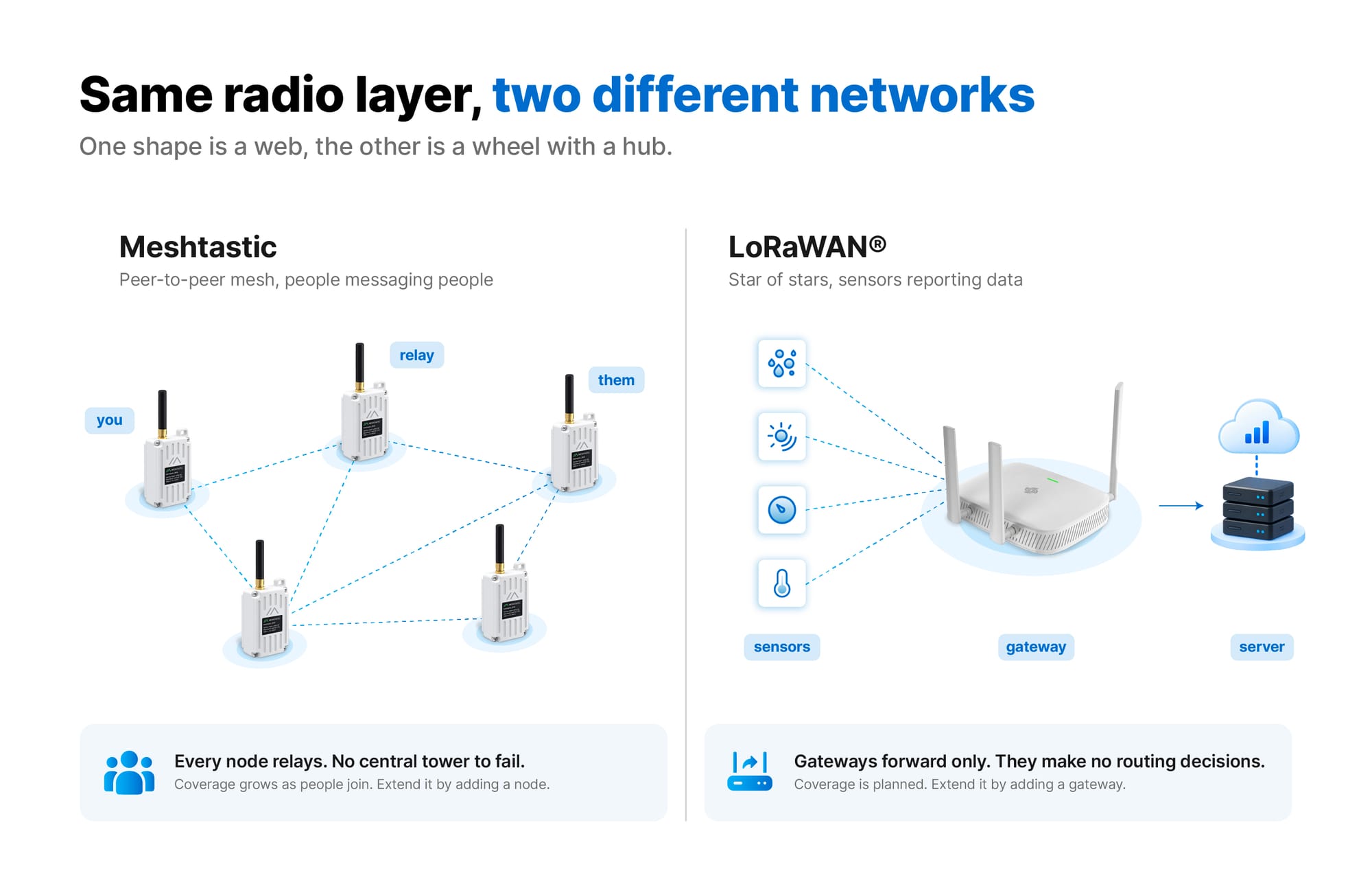
The mesh. Each device is a node, and here is the part that does the heavy lifting. Out of the box, a node relays traffic that is not its own. It listens, then it forwards. Picture you and a friend on opposite sides of a ridge, far outside each other's range, with a third node sitting somewhere between you. Your message travels through that middle node and lands. Nobody configured anything. That relaying is the entire difference between a LoRa mesh network and a pair of walkie-talkies. Coverage grows as nodes are added, and no central tower can fail, because every participant is the infrastructure.
Your phone. The node handles the radio, your phone handles the keyboard and map. They pair over Bluetooth, so you type in the Meshtastic app as you would in any messaging app, with your phone in airplane mode if you like.
For the routing logic in detail, the official Meshtastic project site covers it properly.
Does Meshtastic need the internet or a cell signal?
No. Nodes talk directly to each other over radio, with no SIM, Wi-Fi, account, server or monthly bill. You can optionally bridge a mesh to the internet using MQTT, a lightweight protocol for passing data between systems, but that is an addition you choose, not a dependency you inherit.
Meshtastic range: how far does it actually reach?
Here are figures from a controlled RAKwireless comparison of two versions of the same station. A note on the units first, because the scale is deceptive. dBm means decibel-milliwatts, and it is not linear. Add 3 dBm and you have roughly doubled your output. So the step from 22 dBm to 30 dBm is bigger than those numbers suggest. 30 dBm is a full watt, six times the power.
- The 22 dBm standard station in an urban setting holds usable links of 1 to 3 km, the same output power as most nodes in the Meshtastic ecosystem.
- The 1 W (30 dBm) station, mounted high with reasonable line of sight, reaches much further. RAKwireless field tests recorded stable 12 km links.
Six times the power, and yet the more useful lesson from that test was not about power at all.
Antenna height, placement and repeaters
Antenna height beats wattage. How high your antenna sits will decide your range more than anything else you do. Take one station, move it from 1 m to 3 m, and it comfortably outperforms itself. What stands in the way matters nearly as much. Metal roofs are brutal. Dense foliage drinks signal, and so does any interior wall you were hoping to shoot through. A higher-gain antenna will help you, but not before elevation and line of sight do.
Where terrain blocks a link entirely, the fix is usually another node rather than a bigger radio. A repeater is just a node parked where it can hear both sides, typically on a hill, a roof or a tower.
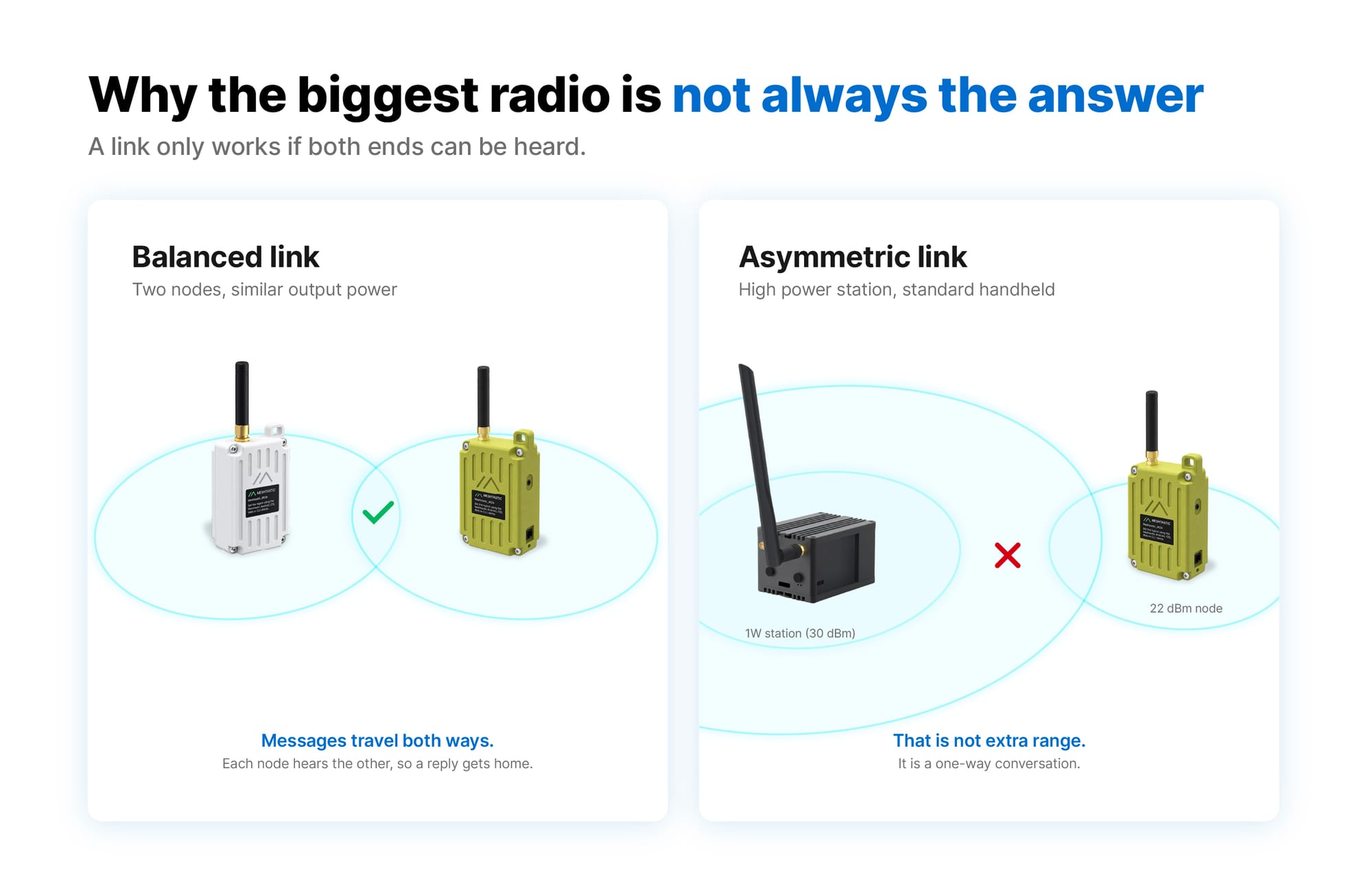
There is also a trap worth knowing before you buy the largest radio available. Running far more power than the nodes around you creates an asymmetric link. Your station shouts across the valley, the small node hears it perfectly, then replies with its own modest radio and nobody hears it come back. That is not extra range, it is a one-way conversation.
What is Meshtastic used for?
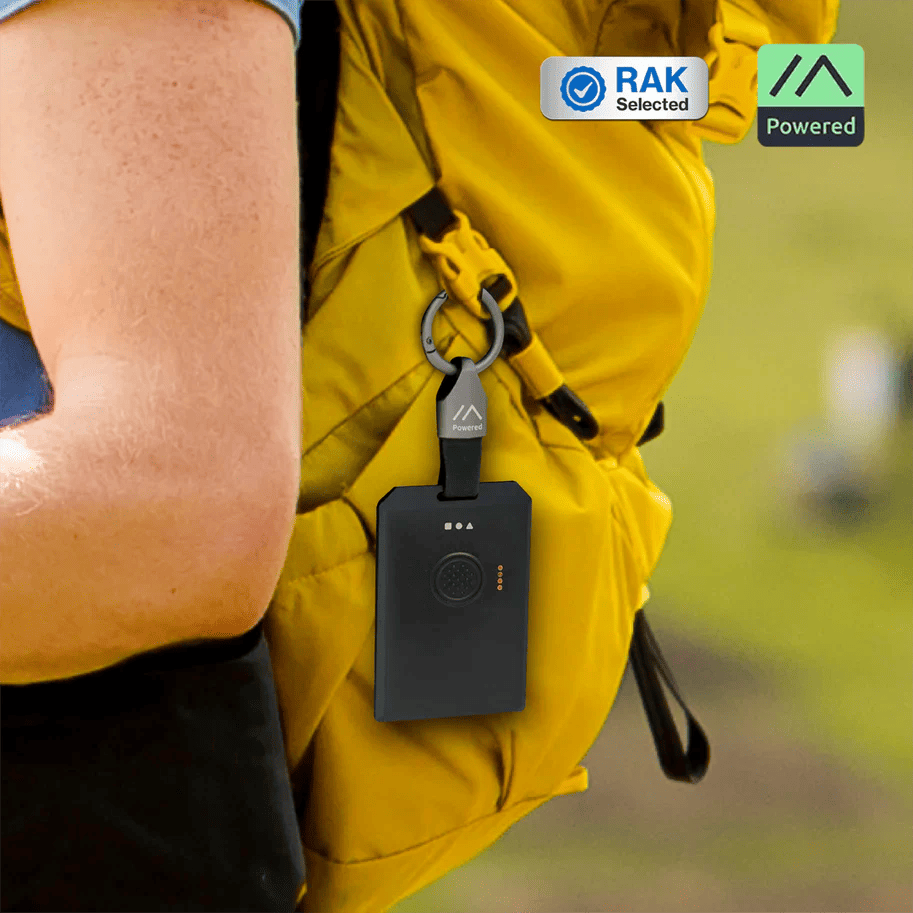
Keeping a group together off grid. Hiking parties and field teams clip on wearable trackers so nobody has to guess where anyone else is. RAKwireless demonstrates this with the WisMesh Tag, a badge-sized unit rated IP66, which is the rating for dust-tight and able to shrug off water jets. No SMS. No calls. Nothing cellular anywhere in the chain. Everyone carrying one shows up as a named marker in the app, and you can check status or watch a location from there.
Emergency communication when networks fail. A mesh that never depended on commercial infrastructure keeps working when that infrastructure goes down, which is why community response groups were among the earliest adopters. Battery and solar-charged nodes keep relaying through outages.
Community networks and work sites. Volunteers seed nodes across a town, campus or festival site so everyone in reach gets a shared layer that costs nothing to run. Farms and construction sites use it where cellular is patchy.
For fixed installations there are Raspberry Pi based stations that arrive with Mosquitto, Node-RED and Grafana already installed. You get an MQTT feed and a local dashboard of node status and signal quality, running on the box in front of you rather than someone else's cloud.
Meshtastic setup: what you need to start
Two things: a node, and a phone you already own. A conversation needs at least two nodes, so most people buy a pair or join an area where a community mesh already exists.
Ready-to-use device or DIY build?
Both start from the same radio. What changes is how much of the work is already done for you.
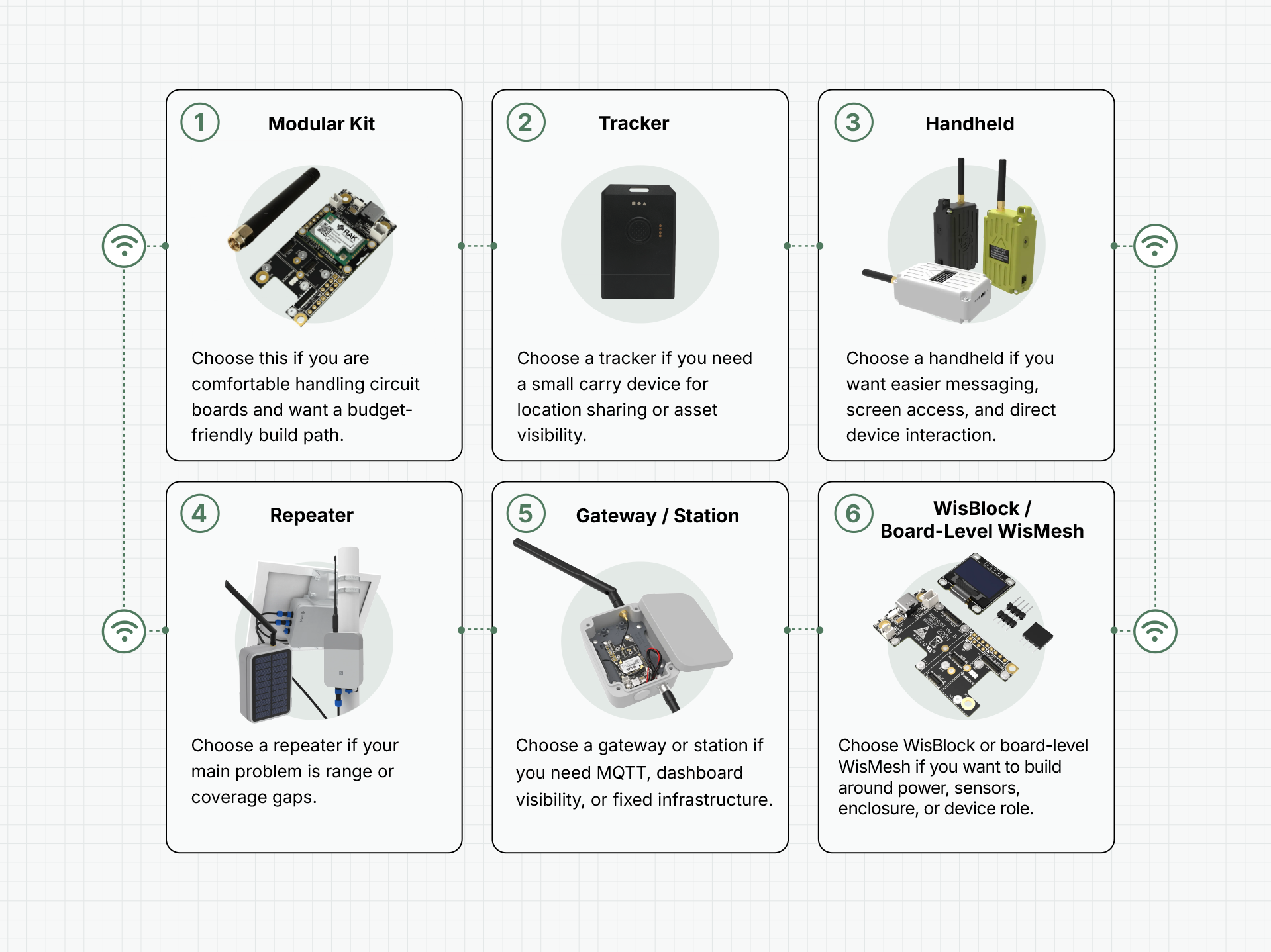
The real question is whether you want the network or the project. RAKwireless sells both routes in its Meshtastic device collection: assembled units like the WisMesh Board ONE Pocket and the WisMesh Pocket V2, alongside the bare WisMesh Board ONE for people who want to build their own enclosure.
Your first thirty minutes
1. Unbox. Attach the LoRa antenna before powering on.
2. Power on. Slide the side switch. A colored status light reports what the device is doing: solid red charging, solid green running, blue blinking when a message arrives.
3. Pair. Open the Meshtastic app, select the device, confirm the Bluetooth pairing.
4. Set your region. The app will not transmit until you choose it. This keeps you on your local frequency, so it is not optional.
5. Send a message. You are on the mesh.
On the Board ONE Pocket, one press of the left button switches the screen, a double press broadcasts your location, and a triple press toggles GPS. Devices ship with firmware installed, so updating is optional. When you do want it, the official Meshtastic web flasher walks you through the whole thing from a browser tab.
/
GPS or non-GPS?
Choose GPS if you want the node to report its own position for tracking and mapping. The receiver draws meaningfully more power, so plan for shorter runtime rather than multi-day battery life.
Choose non-GPS for messaging, longer battery life, and a free expansion slot for sensors such as environmental or motion modules. Your phone can still supply position when it has a fix.
Meshtastic channels, encryption and privacy
Conversations live on channels, and a shared key locks each one. The encryption is AES-256, the same standard guarding bank transfers and classified files. Hold the key, read the channel. Without it you get nothing, and that holds even for the people whose nodes are physically carrying your messages across the mesh. Nodes forward encrypted packets they cannot open.
One honest limitation: the default public channel ships with a publicly known key, because it exists so strangers can find each other. Create your own channel for anything private. The project documents its encryption model in full if you want the specifics.
Is Meshtastic legal, and do I need a license?
Legal, and no license needed for standard use. Meshtastic runs on the ISM bands. That stands for Industrial, Scientific and Medical, and it means shared public spectrum that anyone can transmit on without asking permission, so long as they stay inside the power limits. Your Wi-Fi router lives in the same neighborhood. So does your garage door remote.
Which frequency you use depends on where you are standing. Much of Europe runs 868 MHz. North America runs 915 MHz. That is precisely why the app refuses to transmit until you pick a region, and it is worth getting right the first time. If you are unsure which band applies where you live, your national spectrum regulator publishes the limits.
There is one exception, and it deserves to be taken seriously. High-power 1 W equipment may require a license, or may not be permitted at all in your region. Check before you mount one. Standard 22 dBm nodes carry no such complication.
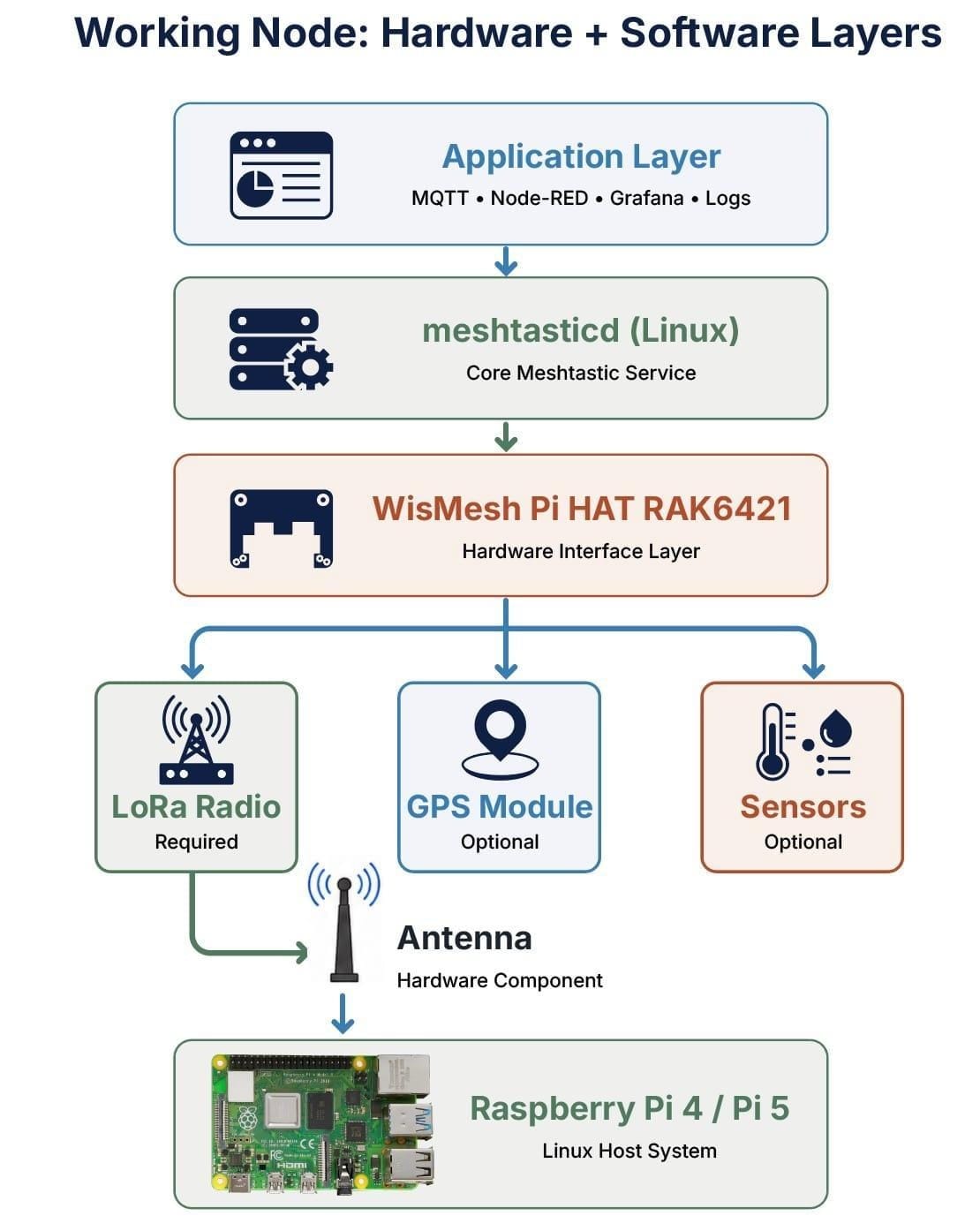
Meshtastic vs LoRaWAN®: same radio, different networks
The two names keep turning up in the same threads, and there is a reason. They sit on the same LoRa radio layer. So what is LoRaWAN? Treat it as the other thing you can build once you have that radio. Hundreds of low-power sensors report inward to a LoRaWAN gateway, which passes their data up to a central server. One shape is a web. The other is a wheel with a hub. Sort that out and you have understood LoRa vs LoRaWAN.
A rough rule: humans reading the messages means Meshtastic. Machines producing readings that some database has to swallow at scale means a LoRaWAN network. Projects graduate from the first to the second somewhere around the point where device counts hit the hundreds. Range per gateway is much the same, since the radio underneath has not changed, but you plan coverage around where the gateways go rather than watching it grow wherever users wander. Our LoRaWAN and LoRa primer goes deeper than this page should.
Frequently asked questions
What is Meshtastic and how does it work?
Meshtastic turns low-power LoRa devices into a private mesh network for texts and GPS positions. Each device relays traffic for its neighbors, so messages hop node to node across distances no single device could cover. You type on your phone, paired to the node over Bluetooth.
Does Meshtastic need the internet or a cell signal?
No. Nodes communicate directly over radio, with no cell tower, SIM card, Wi-Fi or subscription. You can optionally bridge a mesh to the internet using MQTT, but nothing requires it.
How far can Meshtastic reach in real conditions?
Height and line of sight decide this more than which device you buy. RAKwireless testing put a 22 dBm station at 1 to 3 km of usable range in a city. Mount a 1 W station high with a clear view and the same testing held stable links at 12 km. Messages hop between nodes as well, so the network as a whole reaches further than any single link.
Is Meshtastic legal, and do I need a radio license?
In most countries, yes, and no license is required, because Meshtastic runs on license-free ISM bands. Set your region in the app so the device transmits on your local frequency. High-power 1 W hardware is the exception and may require a license or be prohibited where you live.
What do I need to buy to start with Meshtastic?
One node and a phone you already own, though a conversation needs at least two nodes. An assembled device such as the WisMesh Board ONE Pocket works out of the box. A bare board costs less up front but needs a battery, an enclosure you print yourself, and some assembly time.
Is Meshtastic encrypted and private?
Yes. Messages use AES-256 and are readable only by devices holding the channel key, including on nodes that relay them. The default public channel uses a widely known key by design, so create a private channel for sensitive conversations.
TL;DR
- What is Meshtastic? LoRa devices forming a private mesh for texts and GPS positions. No cell towers, no internet, no SIM, no monthly fee.
- Every node relays for the others, so coverage grows with the group and no single failure takes the network down.
- Tested range: 1 to 3 km for a 22 dBm station in a city, stable 12 km for a 1 W station mounted high. Height beats wattage, and overpowering one side creates a one-way link.
- License-free on ISM bands for standard use. Set your region in the app. 1 W gear may need a license locally.
- Encrypted by default with AES-256 per channel, though the default public channel is intentionally open.
- To start: one assembled node, a phone, about 30 minutes.
- vs LoRaWAN: peer-to-peer messaging for people, versus gateway-based data collection for sensors.
Ready to try it? Pick up a WisMesh node and send your first mesh message today. Not sure which one fits? Start with our guide to the best Meshtastic devices for beginners.
Meshtastic is a registered trademark of Meshtastic LLC. LoRa® and LoRaWAN® are registered trademarks of Semtech Corporation.